Crossword Go!
- 4.9
- Rating
- 1.00M
- Installs
- Free
- Price
 Analysis by App-foxy
I spent time with Crossword Go as a casual word game, and my first impression was that it aims for a very familiar kind of break: open a puzzle, solve a few clues, and give your attention something lighter to work on. It comes from PlaySimple Games and sits in the word-game category, with a free entry point and optional purchases. That combination makes it easy to try, but it also means the real question is not simply whether the puzzles are enjoyable. It is whether the game remains comfortable when progress, hints, and spending enter the picture.
My answer is mostly positive, with an important qualification. I think this is a good fit for people who want short crossword sessions on a phone rather than a formal newspaper-style crossword experience. It is especially suitable for filling a commute, waiting room, or quiet few minutes before bed. However, players who want completely open-ended puzzles, a strict no-purchase environment, or a deeply competitive word challenge may prefer a more traditional crossword app. Crossword Go feels designed around approachable daily play, not around proving that you can solve the hardest grid available.
How Crossword Go feels in everyday play
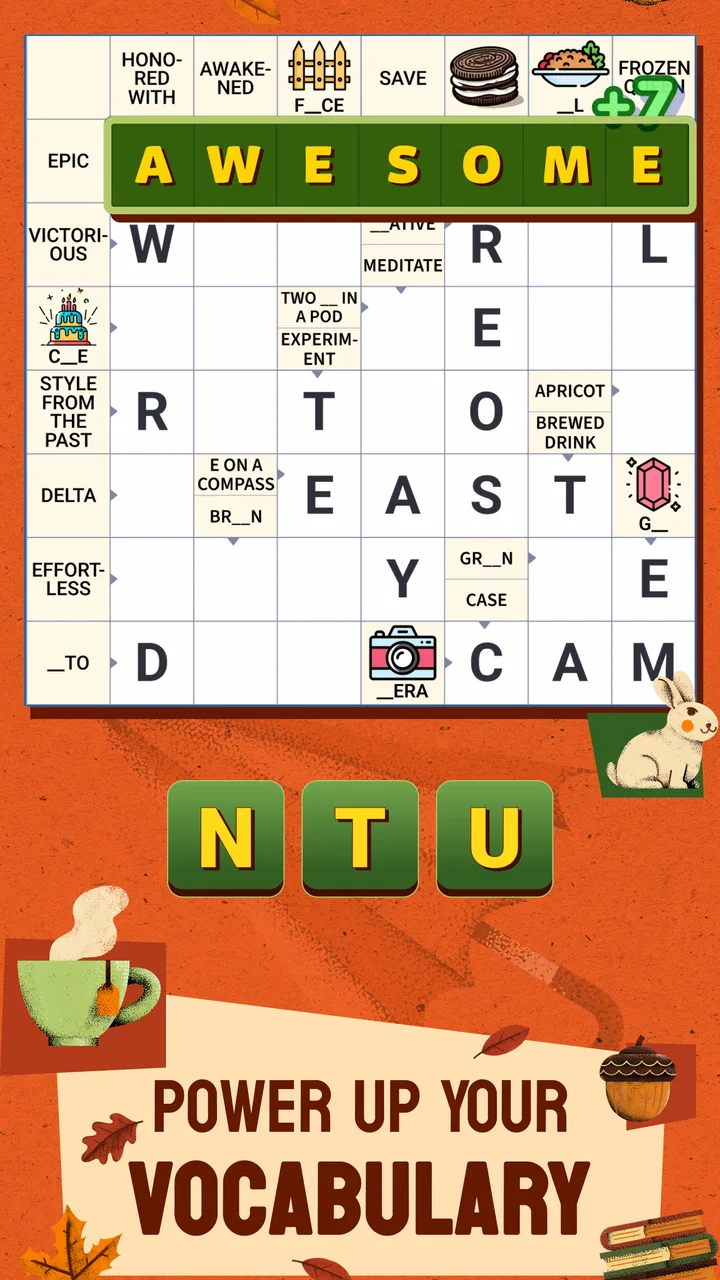
The central appeal is easy to understand: the game turns crossword solving into a repeatable mobile routine. I can pick it up without preparing for a long session, work through clues at my own pace, and stop when my attention starts to fade. That matters because phone games often fail by demanding too much commitment at the wrong moment. A crossword format naturally supports pauses, and this one is most enjoyable when treated as a small mental break instead of a task that must be completed immediately.
You May Also Like

 Blood Strike: 2.5 Anniversary
Blood Strike’s Loadouts Turn Every Drop Into a Tactical Gamble
A close look at Blood Strike’s custom loadouts: how fast access to signature weapons reshapes its battle royale rhythm, rewards preparation, and narrows the gap between fights.

 Pandora - Music & Podcasts
Pandora’s Music Is Easy to Start, but Harder to Recover
Pandora’s strength is its low-effort path from a seed to a station. Its weak spot is how much confidence it asks you to place in connection, setup, and quiet recovery.

 8 Ball Pool
 Is Built on Rivalries, Rematches, and Routine
A close look at the rivalries, rematches, shared routines, and unanswered safety questions that turn a quick pool match into a persistent mobile community.

 Samsung Music
’s Quiet Strength Is Playing What You Already Own
Its reach comes less from spectacle than from dependable access to a personal library. That simplicity is both the app’s strongest retention engine and its ceiling.

 AccuWeather: Weather Radar
AccuWeather Review: A Quick, Clear Forecast for Everyday Decisions
For everyday plans, the best forecast is the one you can understand quickly. AccuWeather makes rain timing, radar, and local conditions easy to act on, with a few trade-offs.

 Hill Climb Racing
Why Hill Climb Racing Still Turns Crashes Into One More Run
A tiny car, a bumpy hill and one more upgrade: Hill Climb Racing keeps resurfacing because its simple chaos makes every near-miss feel personal.
More From Our News Desk
View All News


The puzzles also suit different levels of concentration. When I am alert, I can look for clue connections and use crossing letters to narrow down uncertain answers. When I am tired, I can make progress through the obvious entries and return to the stubborn gaps later. That flexible rhythm is more useful than it sounds. A game that lets me leave a puzzle unfinished without making the session feel wasted is better for everyday use than one that requires a single uninterrupted block of time.
One practical habit improved my experience: I stopped treating every clue as an isolated question. I filled the answers I knew first, then used the crossing letters as a second layer of information. This is standard crossword technique, but the phone format makes it particularly valuable because tapping through guesses can become frustrating. Solving from the crossings reduces random attempts and makes the game feel more like reasoning than trial and error.
Another useful approach is to separate “I do not know this” from “I have not seen enough letters yet.” Those are different problems. If a clue remains unclear, I move to another part of the grid instead of immediately reaching for assistance. Returning with additional letters often reveals the answer naturally. This gives the game a better sense of discovery and helps preserve the satisfaction of solving a puzzle without outside help.
That said, the mobile presentation is not a substitute for a full crossword book. A dedicated crossword enthusiast may find a conventional app more rewarding if it offers larger grids, a broader range of difficulty, or a stronger archive of themed puzzles. Crossword Go is better understood as a convenient, approachable word-game companion. Its strength is the ease of starting and stopping, not necessarily the depth of a specialist crossword platform.
Who will get the most from it
I would recommend it first to casual solvers, people returning to crosswords after a long break, and anyone who likes word puzzles but does not want to study complicated rules. It can also work well for players who enjoy a small sense of routine. Opening the game during a coffee break and solving a handful of clues gives the mind something focused to do without requiring the emotional investment of a larger game.
It is less convincing for someone who wants a completely quiet, utility-like crossword tool. If your ideal experience is a clean grid with no surrounding sense of progression, you may find a traditional crossword application more comfortable. Likewise, players who dislike any form of optional spending should approach this as a free game with purchases available, rather than assuming that every part of the experience is built around a paid crossword subscription or a one-time purchase.
The age classification is Everyone, which matches the accessible nature of a general word game. I would still judge it by the preferences of the individual player, especially when deciding whether optional purchases are appropriate for a child. The game is free to start, but the presence of purchasable items means that a family should use the usual device-level spending safeguards if younger players have access to it.
Spending, hints, and the feeling of pressure
The purchase range is listed as $0.99 to $49.99 per item. That is the most important spending detail for a prospective player because it shows a wide gap between a small optional purchase and the highest listed item. I do not see that as a reason to reject the game automatically, but I do think it changes how I would recommend using it: begin without buying anything, learn how often you actually need assistance, and decide later whether the convenience is worth paying for.
My preferred rule is simple: do not spend to rescue a puzzle that you have barely attempted. Crossword games are at their best when the player gives the clues and crossings a fair chance first. If I use assistance too early, I may finish the grid, but I lose the thinking process that makes the format satisfying. Saving help for a genuinely blocked section keeps purchases, if I choose to make one, connected to convenience rather than impatience.
This also creates a useful distinction between a game being difficult and a game making the player feel hurried. Difficulty can be enjoyable when it encourages a new angle on a clue. Pressure is less welcome when it makes me think about resources before I think about words. I therefore recommend playing in short, relaxed sessions and treating unfinished progress as normal. That mindset reduces the temptation to spend simply because a puzzle has become inconvenient.
For a careful player, the free starting point is enough to judge whether the basic loop works. I would not buy anything during the first session. I would instead pay attention to three things: whether I enjoy the clue style, whether I can make progress without assistance, and whether the game remains pleasant when I stop midway. Those observations tell me more than a quick reaction to the store summary.
The game’s current version is 1.40.0, and it requires Android 8.0 or later. Those details are useful when deciding whether an older phone can run it, but compatibility alone should not determine the purchase decision. A supported device may launch the game perfectly while the player still dislikes the puzzle tone or the surrounding progression. Trying the free version first is the sensible order.
Fairness for solo players and competitive-minded users
Crossword Go is primarily a personal solving experience for me. I judge success by how well I understand the clues and how satisfying the completed grid feels, not by whether I have outperformed another person. That makes fairness less about a leaderboard and more about whether optional spending undermines the value of solving. If assistance is available, the fairest way to use it is as a last resort, not as the default route through every puzzle.
Players who enjoy competition should be careful about what they expect from this format. A word game can feel competitive because it has progress, goals, or a sense of keeping up, but that is not the same as a carefully balanced head-to-head crossword contest. If your priority is comparing solving speed or skill under identical conditions, a dedicated competitive crossword platform may be a better choice. Crossword Go suits personal improvement more naturally than serious ranking.
There is also a fairness question around different solving styles. Someone who knows a wide range of vocabulary may move quickly through clues that leave another player stuck, while a patient player may compensate by using crossings more effectively. Neither approach is wrong. I like that the crossword structure gives slower solvers a route forward through deduction, but I would not describe every completed grid as a pure measure of vocabulary. Familiarity with clue conventions and willingness to revisit a section matter just as much.
A helpful self-imposed challenge is to finish a puzzle in two passes. On the first pass, I enter only answers I feel reasonably confident about. On the second, I work through partial words and crossings. This keeps the session fair to my own skill and makes it easier to tell whether I am learning the game’s clue language or merely leaning on assistance. It is also a better way to compare my performance from one session to the next.
What I would check before committing to long-term use
There are several practical questions I would answer through personal use rather than assumptions. First, I would see whether the available puzzle style matches my vocabulary and patience. Some players enjoy short, direct clues; others want dense wordplay and unusual themes. A game can be well made and still feel wrong if its clue approach does not match the way you like to solve.
Second, I would watch how my progress feels over several sessions. A single enjoyable puzzle proves that the basic idea works, but long-term value depends on whether I still want to return after the novelty fades. I would look for a comfortable balance between easy wins and sections that require thought. If every puzzle feels effortless, the game may become background tapping. If too many clues require help, the free experience may feel less satisfying.
Third, I would decide how I want to handle purchases before they become relevant. The listed items range from $0.99 to $49.99, so setting a personal limit is more sensible than making decisions in the middle of a frustrating grid. For me, that means considering any purchase as a convenience budget, never as a requirement for proving that I can solve. It also means remembering that a larger item is not automatically better value if I do not play regularly.
Finally, I would check the game on the device I actually plan to use. Android support begins at version 8.0, and the game is free to install, so the barrier to testing it is low for compatible users. Still, comfort matters: crossword play involves reading clues, tapping letters, and moving between uncertain answers. If the screen or controls make that tiring, the convenience of a phone game disappears quickly.
My verdict after weighing the trade-offs
Crossword Go earns its place as an approachable word game because it makes crossword solving easy to fit into ordinary life. I like it most when I use it as a focused pause rather than a race. The free entry point lets me test the experience, and the Everyone rating makes the concept broadly accessible. PlaySimple Games has chosen a format that can appeal to both occasional solvers and people who enjoy returning to word puzzles regularly.
The strong reception is notable: it has a 4.9 average from around 20K ratings, with over 500K installs. I treat those figures as encouraging rather than decisive. They suggest that many players enjoy the experience, but my own recommendation still depends on your expectations. A high rating cannot turn a casual crossword game into a specialist puzzle archive, and it cannot remove the need to think carefully about optional spending.
My final advice is to install it if you want friendly, low-commitment crossword sessions and are comfortable ignoring purchases until you understand your habits. Start with the clues you know, use crossings before assistance, and let difficult grids wait when you are tired. Skip it in favor of a more traditional or competitive alternative if you want rigorous tournament-style solving, a one-time paid experience, or a game with no purchase decisions at all.
For me, the best part is the small daily ritual: a few clues, a moment of concentration, and the satisfaction of seeing an uncertain answer become clear. The main limitation is that the same accessible design may feel too guided or too casual for experienced crossword purists. With that expectation set correctly, Crossword Go is a worthwhile free word-game download, provided you keep your spending deliberate and let your own solving remain the main reward.
FAQs for Crossword Go!
01What is Crossword Go! and how does it work?
Crossword Go! is a dynamic puzzle app designed for both casual and avid crossword enthusiasts. It offers a vast array of puzzles that vary in difficulty, catering to beginners and experts alike. Users can select puzzles based on difficulty, track their progress, and even compete with friends or other players online. The intuitive interface ensures smooth gameplay, making it easy to fill, erase, and check answers.
02Is Crossword Go! free to download and play?
Yes, Crossword Go! is free to download on both Android and iOS platforms. The app provides a selection of free puzzles and daily challenges. However, it also offers in-app purchases for premium features, additional puzzle packs, and an ad-free experience. This allows users to enhance their puzzle-solving experience if they choose to invest in these extras.
03What features does Crossword Go! offer to enhance the user experience?
Crossword Go! boasts a variety of features such as daily challenges, multiplayer modes, and a hint system to assist players when they get stuck. It also includes a leaderboard to track and compare scores with friends globally. The app's sleek design and user-friendly interface make it easy to navigate, ensuring a seamless experience whether you're playing solo or with others.
04Can I play Crossword Go! offline?
Yes, Crossword Go! allows users to download puzzles for offline play. This feature is particularly useful for those who want to enjoy the game without using mobile data or while traveling. However, online features such as multiplayer mode and leaderboard updates require an internet connection to function.
05How does Crossword Go! ensure a challenging experience for advanced players?
Crossword Go! offers puzzles with varying levels of difficulty, including expert-level challenges that test even the most seasoned players. The app regularly updates its puzzle library with fresh content to keep advanced players engaged. Additionally, the competitive multiplayer mode allows users to challenge others, adding an extra layer of difficulty and excitement.
Pros
- User-friendly interface for all ages.
- Daily challenges keep users engaged.
- Offline mode available for travel.
- Hints system helps when stuck.
- Customizable themes enhance experience.
Cons
- Limited free puzzles available.
- Ads can be intrusive at times.
- No multiplayer option yet.
- Occasional lag on older devices.
- In-app purchases can be pricey.

Crossword Go!
Gallery